


Best Wallet Review: Full Analysis and Opinions 2026
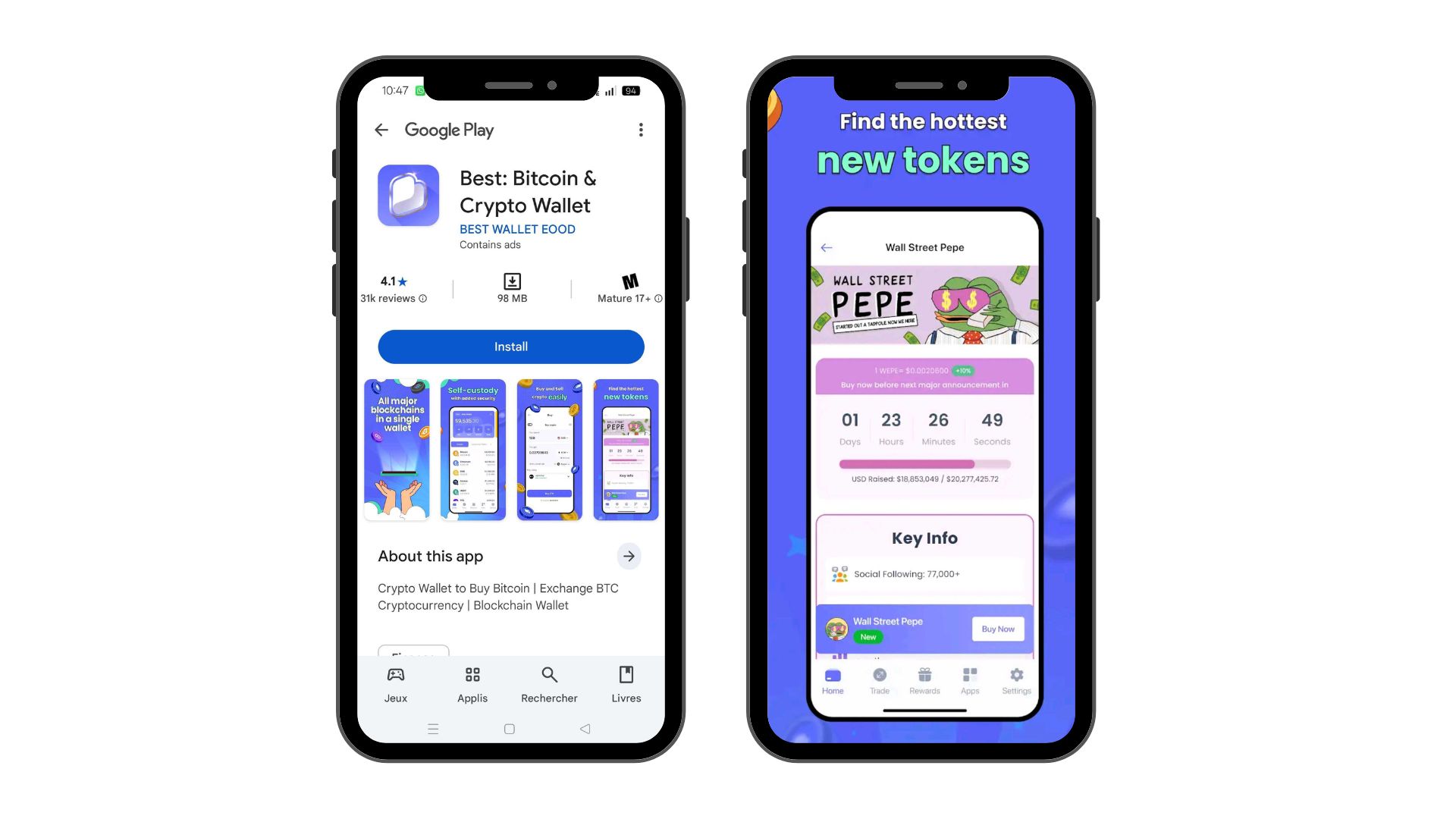
Best Wallet has entered the competitive non-custodial wallet market with bold claims about comprehensive features and multi-chain support. Users can access everything from basic crypto storage to advanced DeFi tools and exclusive token launches, all from a mobile app. But does the platform actually deliver value, or does it overpromise?
This Best Wallet review examines every aspect of the platform through hands-on evaluation and verified research. We cover its security model, features, fees, and real user feedback to determine whether Best Wallet delivers on its promises and whether it deserves a place in your crypto toolkit.
Our team tested the app on both iOS and Android, executed swaps, and analyzed the presale launchpad. We also reviewed community forums to surface complaints and praise alike. The analysis that follows presents both sides so you can decide if Best Wallet fits into your crypto strategy.
Best Wallet: Overview, Key Highlights & Main Features
Best Wallet operates as a non-custodial cryptocurrency wallet app available for both iOS and Android users.
▪️ Best Wallet supports over 60 blockchain networks, so you can store, send, receive, and swap digital assets from Ethereum, Binance Smart Chain, Polygon, and dozens of other chains in one place.
▪️ An integrated DEX aggregator compares rates across multiple exchanges and executes swaps through a single interface without platform switches.
▪️ A token presale launchpad provides early access to new projects before they appear on major exchanges.
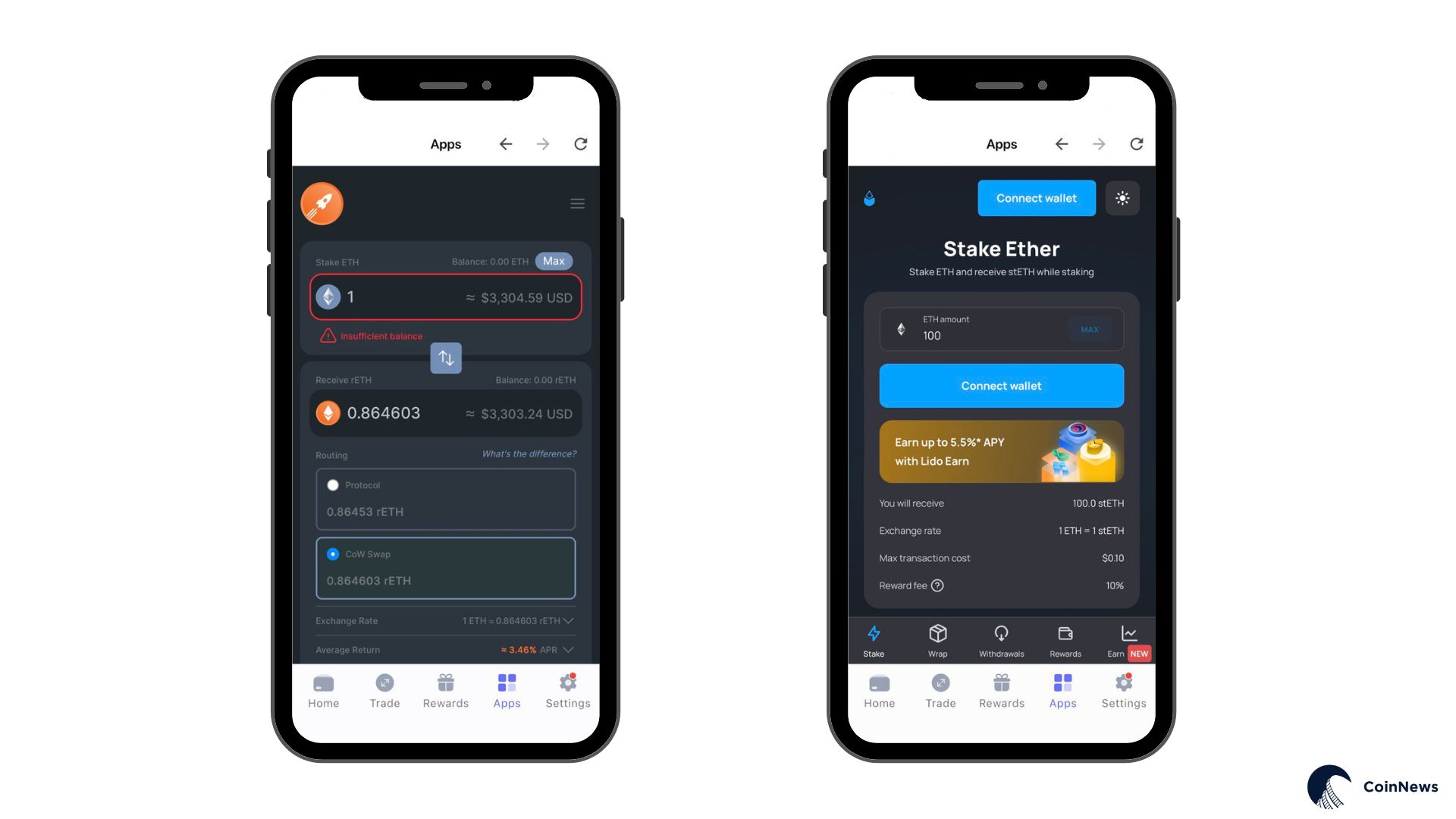
▪️ Protocol connections like Lido and Rocket Pool power current staking features, with a dedicated aggregator under development.
▪️ Portfolio tracking displays your total value across all assets with real-time updates and sub-portfolio organization options.
▪️ Built-in dApp browser grants direct access to DexScreener, DexTools, and PancakeSwap for DeFi activities.
A detailed summary of Best Wallet’s features:
| 🏷️ Attribute | ℹ️ Detail |
|---|---|
| Wallet Type | Non-custodial mobile app (hot wallet) |
| Supported Assets | 1,000+ cryptocurrencies on 60+ blockchains |
| Platforms | iOS, Android (browser extension in development) |
| Notable Features | Built-in DEX for swaps, presale launchpad, multi-chain support |
| Security | MPC key management, 2FA, biometric login |
| Fees | App is free; network fees on transactions apply |
| Launch Year | 2025 |
| Company | Best Wallet EOOD (Bulgaria) |
| User Base | 500K+ downloads (Google Play), 4.4★ App Store rating |
What Is Best Wallet?
This wallet functions on a self-custody model, where you hold your private keys and maintain full control over your funds. Your assets stay in your possession at all times. Should you need to restore access, encrypted cloud backup via iCloud or Google Drive enables full wallet recovery.
Best Wallet EOOD (a company registered in Sofia, Bulgaria) develops and maintains the app. Anonymous developers run core operations, though the company has a named director and legal registration documentation. Major wallets like MetaMask (Consensys) and Trust Wallet (Binance) offer more corporate transparency through their public ownership structures.
As a hot wallet, Best Wallet connects to the internet for transactions. This makes it practical for daily use, DeFi interactions, and frequent trades, but creates more exposure than offline hardware storage for long-term holdings.
Multi-chain holders who need a unified interface make up the primary user base. DeFi participants who swap tokens frequently also find value here, as do speculators who chase early presale opportunities. Privacy-conscious users can operate without KYC for basic wallet functions, but fiat on-ramp services require identity verification through third-party providers.
Best Wallet: Pros & Cons Lists
We tested Best Wallet across iOS and Android devices to identify its strengths and weaknesses for different user types.
Pros
-
Full self-custody control with user-held private keys
-
MPC technology and 2FA provide strong security for a hot wallet
-
Supports 60+ blockchains and 1,000+ tokens in a single app
-
Built-in DEX aggregates rates from 330 exchanges for competitive swaps
-
Presale launchpad offers early access to token sales
-
No KYC required for basic wallet functions
-
User-friendly mobile interface with positive app store ratings
Cons
-
Anonymous development team raises transparency concerns
-
Limited track record (launched in 2025)
-
No desktop app or browser extension yet
-
Customer support limits users to email with no live chat
-
Mixed Trustpilot reviews (2.2/5) cite presale token issues
-
Some features remain in development (staking aggregator, debit card)
Features & Functionalities: CoinNews Test of Product
Best Wallet packs substantial functionality into its mobile interface. We tested core features to evaluate performance, usability, and how well the app delivers on its promises.
Core Wallet Functions: Send, Receive, Swap
Basic wallet operations perform as expected. When you need to receive crypto, Best Wallet generates the appropriate address for each supported blockchain. Bitcoin deposits go to a BTC address, Ethereum-based tokens to your ETH address, and so on. QR codes appear for easy scan access.
We sent several test transactions and found the process straightforward. Fee estimates show up before confirmation, and transactions are processed without delays on the networks we tested. Users who manage assets across multiple chains can avoid the hassle of separate wallet apps.
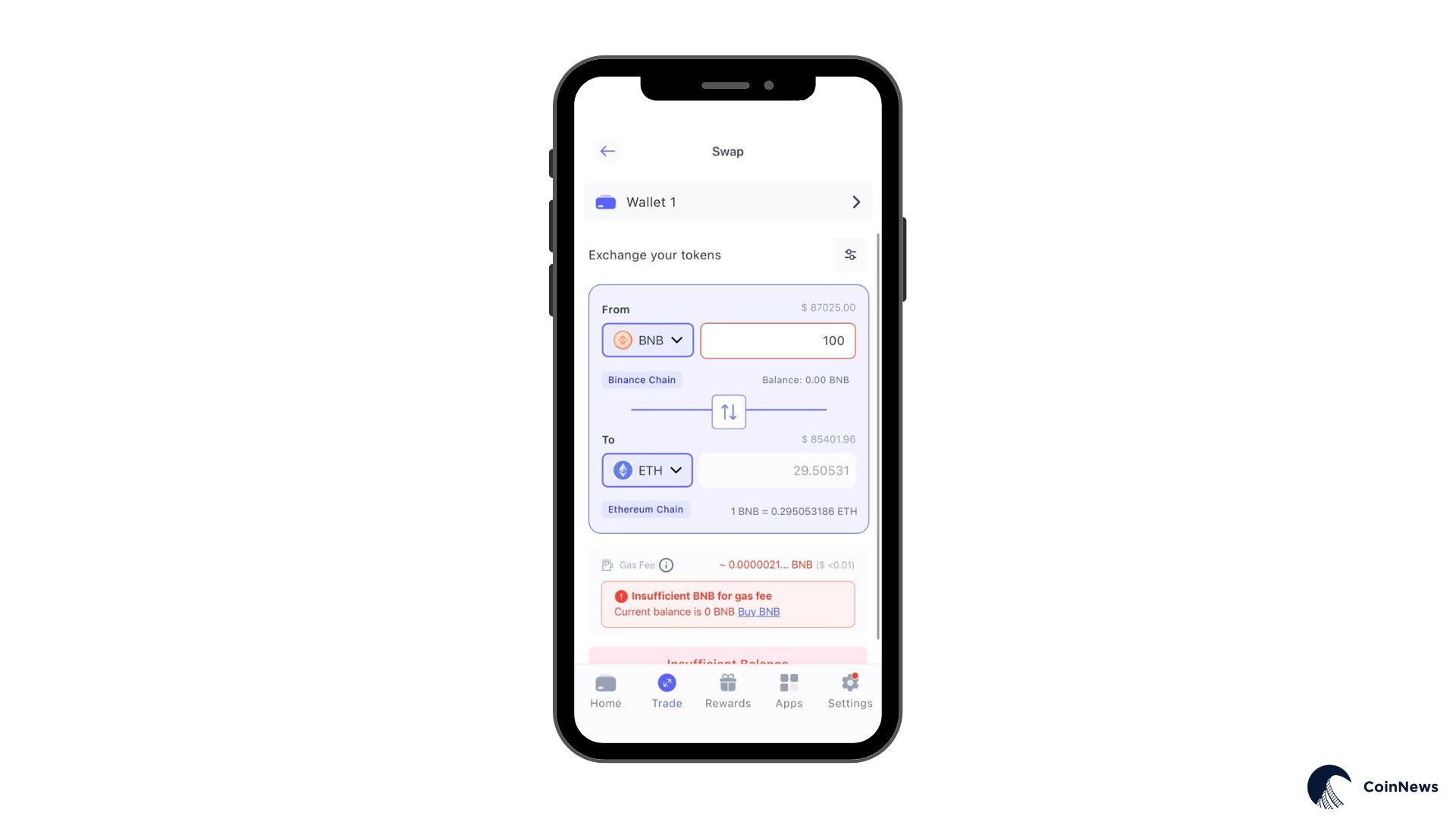
Best DEX integration powers the swap feature as a headline capability. This aggregator pulls quotes from 330 decentralized exchanges across 60 blockchains plus 30 cross-chain bridges. We tested a BNB-to-ETH swap and received a competitive rate that matched quotes from standalone DEX aggregators.
Cross-chain swaps work within the same interface. You can swap Bitcoin for Ethereum or Solana for a BNB Chain token without external bridges or multiple apps. Automatic routing handles the technical work. Our test swap executed in under a minute, and destination tokens showed up in the wallet shortly after.
DeFi, dApps, and NFTs
Best Wallet includes a built-in dApp browser that connects to DeFi protocols, NFT marketplaces, and blockchain games. You can access DexScreener, DexTools, and PancakeSwap directly through the app.
Protocol connections like Lido and Rocket Pool power the current staking functionality. You connect to these dApps and stake through their interfaces while Best Wallet handles the wallet connection. Developers build a dedicated staking aggregator that will route assets to pools with the best yields when it becomes available.
An iGaming hub provides direct access to crypto casinos through the wallet. Best Wallet partnered with platforms like CoinCasino, WSM Casino, BC.Game, and several other gaming sites. Users who engage with casino features receive exclusive bonuses through these partnerships.
NFT gallery features for Ethereum and Polygon collections remain in development on the platform roadmap. After launch, users will be able to view, send, and manage NFTs through the wallet interface.
Fiat On-Ramp and Off-Ramp
Best Wallet supports fiat purchases through third-party providers via Wert, a payment infrastructure that connects traditional banking with cryptocurrency. You can buy crypto with credit cards, bank transfers, Apple Pay, and other payment methods. These transactions require KYC verification through the payment provider, not Best Wallet itself.
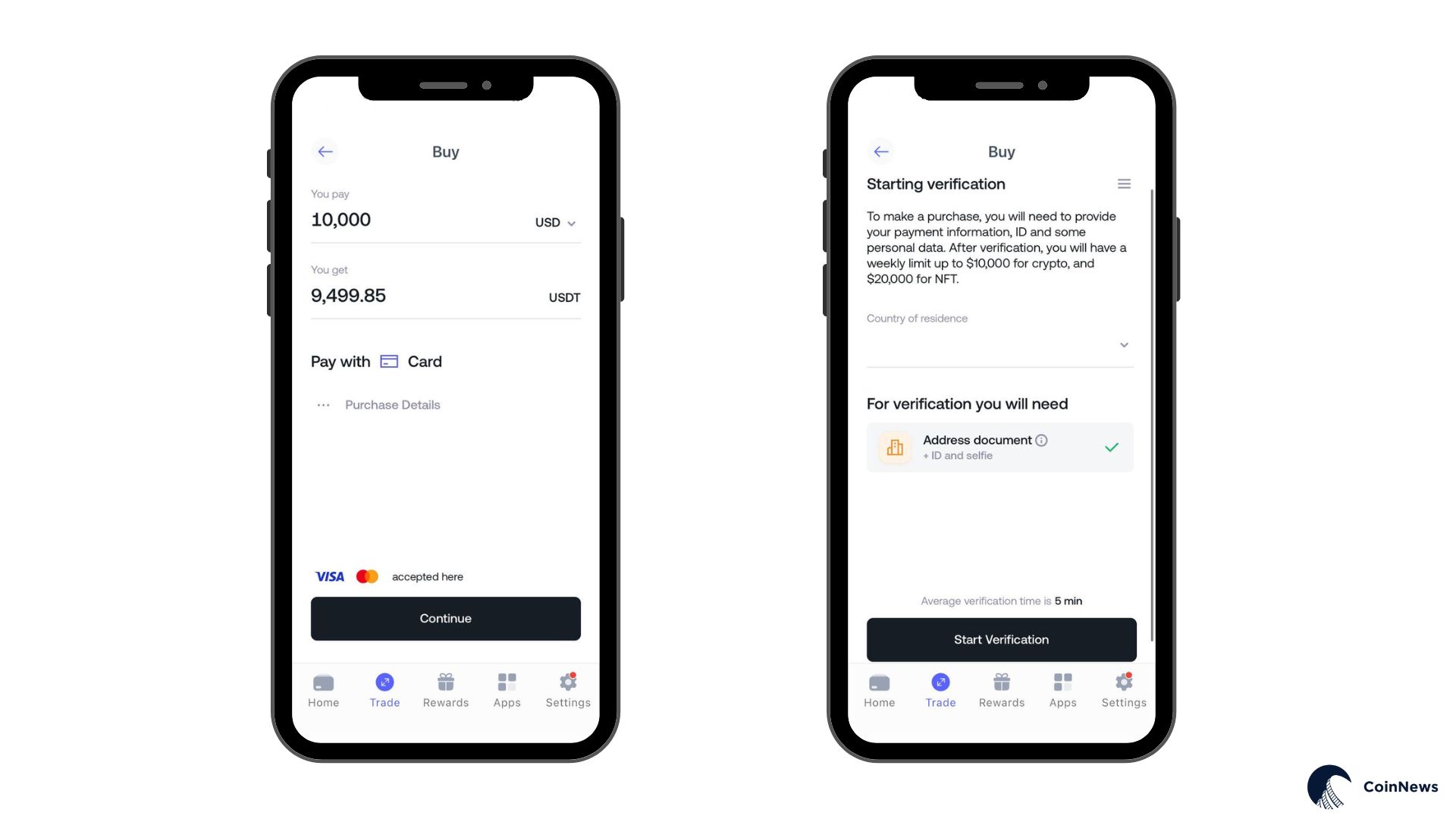
Crypto-to-fiat conversion follows the same route. You can sell assets and withdraw funds to a bank account or card. Few non-custodial wallets offer a complete fiat loop, so Best Wallet simplifies the path from cash to crypto and back.
Token Launchpad
The “Project Directory” section functions as a presale launchpad where users can buy into new cryptocurrency projects before exchange listings. This feature distinguishes Best Wallet from standard wallets like MetaMask or Trust Wallet, which stick to storage and swaps.
The process works through simple in-app purchases. You select a presale, contribute crypto, and claim tokens after launch. Best Wallet curates projects that appear on the launchpad, though due diligence remains your responsibility.
CoinNews Research: User feedback on this feature splits sharply. Some appreciate convenient early access to projects, while others on Reddit and Trustpilot report losses on presale tokens that performed poorly after launch. Crypto presales carry inherent risk regardless of platform, and some projects will fail. We recommend treating any launchpad investment as highly speculative and limiting exposure to amounts you can afford to lose.
The $BEST Token
An ERC-20 utility token powers the wallet’s ecosystem and provides multiple benefits. Holders can access Best Wallet token staking rewards along with other perks:
- Reduced swap and transaction fees within the wallet
- Enhanced APY rates on staked assets once the aggregator launches
- Governance voting rights on protocol proposals
- Early access priority for presale allocations
- Exclusive perks on the upcoming Best Card debit card
A fixed supply of 10 billion tokens exists with no additional minting capability. Smart contracts went through audits by Coinsult and CertiK. As of early 2026, $BEST trades around 0.001708 with a market cap of around $2.85 million on exchanges like MEXC and KuCoin.
Basic wallet functionality requires no $BEST tokens, as the native asset provides optional benefits for users who want deeper platform engagement. Token holders gain more utility as Best Wallet expands its DeFi features, staking aggregator, and payment card integration.
Additional Features
Several smaller features round out the functionality:
🗂️ Multi-wallet management lets you create and switch between separate wallets within the app. Labels and color codes help with organization, particularly when you separate trade funds from long-term holdings.
📊 Portfolio tracking shows your total value across all assets with real-time prices. Sub-portfolios let you isolate specific cryptos to invest in, like meme coins or presale tokens.
⚙️ Custom token support allows you to add any ERC-20 or compatible token by contract address. We tested this with an unlisted token, and it appeared immediately with the correct balance.
👤 No-KYC operation for core wallet functions means you can create an account and transact without personal details. Identity verification only applies to fiat services.
User Experience & Ease of Use: CoinNews Evaluation
Best Wallet delivers a polished mobile experience that balances feature depth with accessibility. Setup takes minutes, navigation feels logical, and the app performs well on both iOS and Android devices.
Setup Process
Installation follows standard patterns. Download from the App Store or Google Play and tap “Add Wallet” to begin. Choose a name and color for your wallet, then tap “Start using your wallet” to complete the initial setup.
You can set a PIN and add biometric authentication for faster access. Cloud backup through Fireblocks MPC technology via iCloud (iOS) or Google Drive (Android) provides encrypted recovery options. We recommend you enable two-factor authentication for enhanced security.
Our test showed the entire process takes under five minutes. Clear instructions guide you through each step, so even crypto newcomers can get started quickly. For detailed step-by-step instructions, see our complete setup guide below.
Interface and Navigation
Best Wallet adopts modern mobile conventions with a clean layout and bottom navigation bar. Your main dashboard shows portfolio value and asset list. Tabs provide quick access to the swap interface, dApp browser, launchpad, and settings.
Logic drives the feature organization. We found everything without menu searches, and icons make functionality obvious. Multi-chain assets coexist on the same screen. You interact with your Bitcoin, Ethereum, and Solana holdings without manual network switches.
Performance stayed smooth throughout our tests. Balances loaded quickly, swaps executed without lag, and we encountered no crashes. A few users report occasional sync delays with token balances. We noticed once that a new token took about a minute to display after a swap. A manual refresh resolved it.
Daily Usage
Routine crypto tasks flow smoothly through the app. We sent and received crypto, swapped tokens, and browsed dApps without friction. Multi-wallet features let you keep trade funds separate from cold storage allocations.
Bitcoin management stands out because many multi-chain wallets handle BTC awkwardly. Best Wallet treats Bitcoin as a native asset alongside Ethereum and others, so users who hold both get simpler management.
Desktop users must manage everything from their phones until the browser extension launches because the app only runs on mobile devices. This matters for complex DeFi interactions where larger screens help, but the mobile app handles most use cases adequately.
*️⃣ iOS users give the app 4.4/5 stars based on nearly 4,000 reviews, while Android users rate it around 4.7/5 with 31,800+ reviews and 500,000+ downloads. These numbers suggest most users find the experience positive.
Security & Trustworthiness (Highest-weight ranking section)
Security carries the highest weight in any wallet evaluation. Best Wallet implements strong technical protections, but team transparency issues and mixed community feedback require an honest assessment.
Key Management and Custody
Your private keys are generated and stored on your device with Best Wallet’s fully non-custodial model. Encryption makes them inaccessible to anyone without your PIN or biometric authentication. The company never holds your keys and cannot access your funds.
Fireblocks MPC (Multi-Party Computation) technology handles key management. This approach splits your private key into multiple encrypted pieces distributed across different locations. Attackers cannot reconstruct the full key without all pieces, even if one component falls into their hands. Fireblocks powers custody solutions for major institutions, so the implementation carries institutional-grade credibility.
MPC cloud backup through iCloud (iOS) or Google Drive (Android) provides your primary recovery method. You can enable biometric authentication or two-factor authentication so only you can access and approve transactions from your wallet. Cloud backup offers encrypted recovery without the need to manage physical backup materials.
Security Features
Best Wallet layers multiple protections to secure your assets and prevent unauthorized access.
🔐 Two-factor authentication adds a verification step for logins and sensitive actions. You can link an authenticator app for one-time codes.
👆 Biometric login through fingerprint or Face ID prevents unauthorized access even if someone obtains your device.
🔢 PIN protection secures app access and only functions on your registered device. Someone who learned your PIN would still need physical access to the device where your keys are stored.
🛡️ All stored data receives encryption protection, and keys never leave your device unencrypted.
These layers place Best Wallet ahead of some competitors on security features. Many popular wallets lack 2FA entirely, and the MPC approach offers a more modern key management architecture than traditional single-key storage.
Trustworthiness Assessment
This is where assessment gets nuanced. Several factors raise legitimate questions:
🕵️ Anonymous team: The core developers remain unnamed. Best Wallet EOOD is legally registered with a named director (Mihail Rachev Nedelchev), but the people who build and maintain the code stay private. Some users find this concerning, given the financial stakes involved.
🆕 Limited track record: The wallet launched in 2025 and has not faced the years of real-world testing that establish confidence in older wallets. No security incidents have occurred yet, but the sample size remains small.
🚨 Regulatory warning: The UK Financial Conduct Authority issued a warning in March 2025 that Best Wallet is not authorized to provide financial services in the UK. This does not prohibit usage, but it signals the company operates outside traditional regulatory frameworks. Non-custodial wallets typically do not require financial licenses since they do not hold customer funds, though the warning still matters for context.
🗣️ Mixed community feedback: App store ratings trend positive, but Trustpilot shows a 2/5 average based on roughly 900 reviews. Many complaints focus on presale token performance and withdrawal timing not wallet security itself. The support team responds to most negative reviews, which shows engagement.
🤔 Reddit skepticism: Multiple threads label Best Wallet as suspicious, primarily citing team anonymity and presale losses. No verified reports of wallet theft or security breaches have surfaced, however. The complaints center on investment outcomes and trust rather than technical failures.
Our Security Verdict
MPC key management, 2FA, biometric locks, and encryption provide strong protection for a hot wallet, making the wallet’s technical security solid. You control your keys, and recovery options give you redundancy.
Trust questions in this Best Wallet review center on the anonymous team and the presale-heavy business model instead of the wallet’s core security. We found no evidence that the app compromises user funds or contains malicious code. Project transparency and investment risk drive the concerns, not storage safety.
Best Wallet’s security measures appear adequate if you plan to store mainstream cryptocurrencies and use swap features. For presale participation, approach with extra caution and limit your exposure. Hardware wallets remain the safest option for large holdings meant for long-term storage, regardless of your choice for daily activity.
Supported Cryptocurrencies & Networks
Best Wallet offers one of the broadest multi-chain coverage options in the non-custodial wallet space. Support spans over 60 blockchains and more than 1,000 individual tokens.
The wallet handles all major ecosystems:

• Bitcoin (BTC) with native support
• Ethereum plus all ERC-20 tokens
• BNB Smart Chain plus BEP-20 tokens
• Solana (added August 2025) plus SPL tokens
• Polygon, Arbitrum, Optimism, and other Ethereum Layer-2s
• Avalanche, Fantom, Tron, XRP, Cardano, Tezos
• Base, Kava, and numerous smaller chains
You can consolidate a diverse portfolio into a single app with this coverage. Bitcoin holders who also participate in Ethereum DeFi and Solana NFTs can manage everything from one interface without the need for separate wallets.
Token Standards and Custom Additions
This wallet automatically recognizes major tokens on supported networks. For newer or lesser-known assets, you can add custom tokens by contract address. We tested this feature with an unlisted ERC-20, and it worked immediately.
NFT support covers Ethereum and Polygon standards, with ERC-721 and ERC-1155 collectibles. A dedicated NFT gallery feature is planned for future updates to improve the display and management experience.
Network Expansion
Developers continue to add blockchain support to Best Wallet. Solana integration arrived in mid-2025, and the roadmap suggests additional networks will follow. Toncoin (TON) appeared as a planned addition in documentation. Ongoing expansion keeps Best Wallet relevant as the multi-chain ecosystem grows.
Privacy Angle
Non-custodial architecture combined with no-KYC requirements (for non-fiat functions) makes Best Wallet suitable for privacy-conscious users. You can create a wallet, receive Bitcoin, and transact pseudonymously without the need to provide personal information. It also ranks among the best anonymous wallets for those who prioritize financial privacy.
Fees, Pricing & Value for Money
The wallet itself costs nothing to download or use. Transaction costs and optional premium features drive the economics.
Transaction Fees
Best Wallet fees consist solely of standard blockchain network costs with no additional platform charges. Bitcoin transactions require Bitcoin network fees, while Ethereum swaps incur gas costs. The platform avoids markup on these base expenses.
An integrated DEX aggregator pulls competitive rates from 330 exchanges. We compared swap quotes against standalone aggregators and found similar rates, so the platform appears to avoid significant markup on trades. $BEST token holders receive additional fee discounts on swaps.
Fiat Service Fees
Purchases through the Onramper integration carry fees from the third-party providers, typically in the 2-3% range based on payment method. Crypto on-ramp services apply these fees as standard practice, and they appear clearly before you confirm any purchase. Fiat withdrawals similarly involve provider fees.
Comparison to Competitors
MetaMask charges a 0.875% service fee on its in-app swaps. Active traders gain a meaningful cost advantage over time if Best Wallet’s aggregator operates without added fees (as it appears to). TTrust Wallet also operates fee-free on basic functions, so Best Wallet matches the industry standard for top decentralized wallets.
Value Assessment
For what it provides, Best Wallet delivers solid value at no direct cost:
- Multi-chain support across 60+ networks
- Integrated DEX with cross-chain swaps
- Presale access (high risk but unique feature)
- Fiat on/off ramps
- Portfolio tracking and management tools
Optional $BEST token holders receive fee discounts and staking benefits, but the wallet remains fully functional without it. Free apps with this feature depth are uncommon, so the value proposition proves strong for users who will actually leverage the functionality.
How to Set Up & Use Best Wallet
The setup takes just a few minutes, and here is the step-by-step process:
1️⃣ Download the App
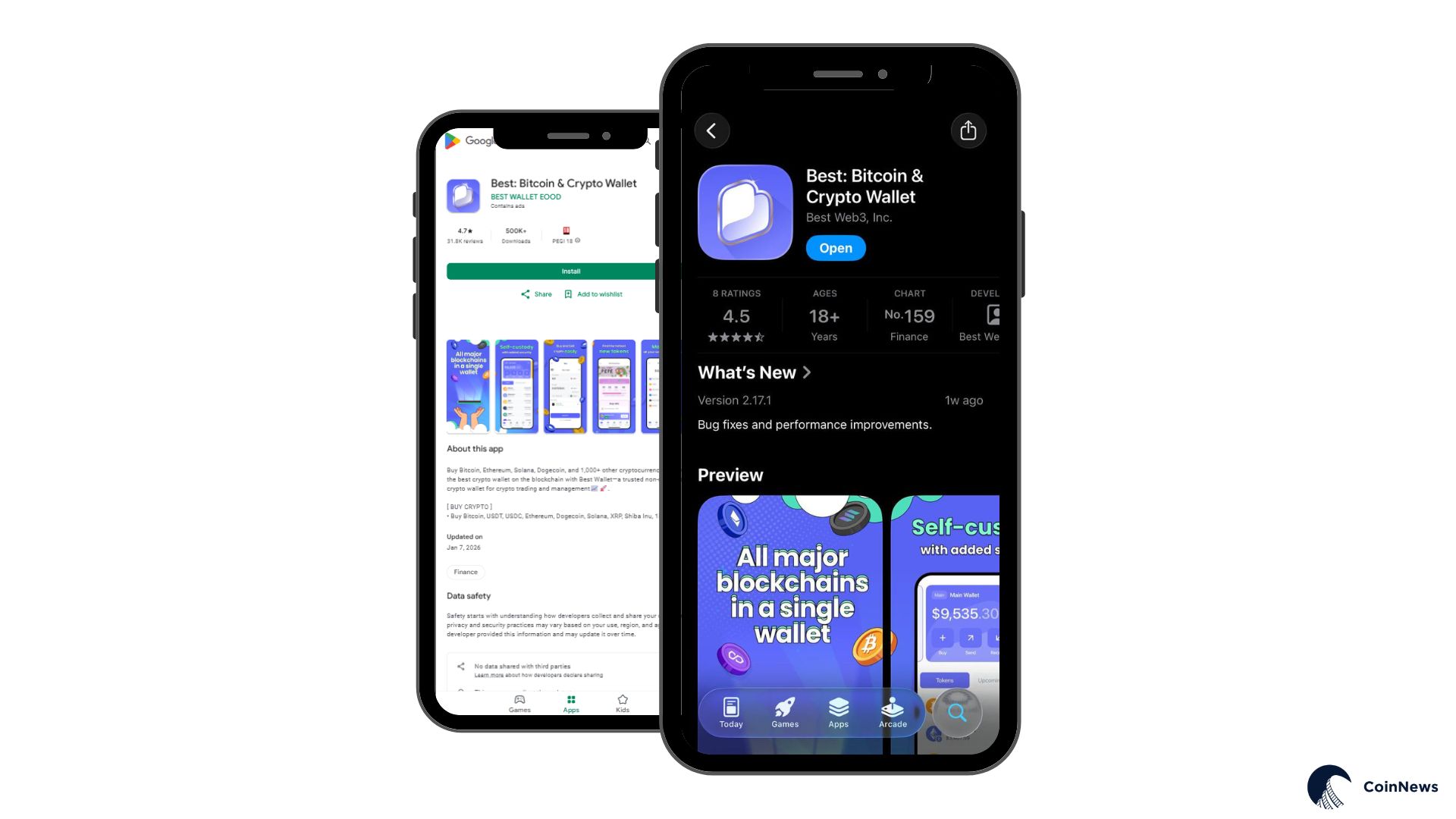
Visit the Apple App Store or Google Play Store and search for “Best Wallet app.” Confirm you download the official app from Best Wallet EOOD to avoid fake versions.
2️⃣ Set Security
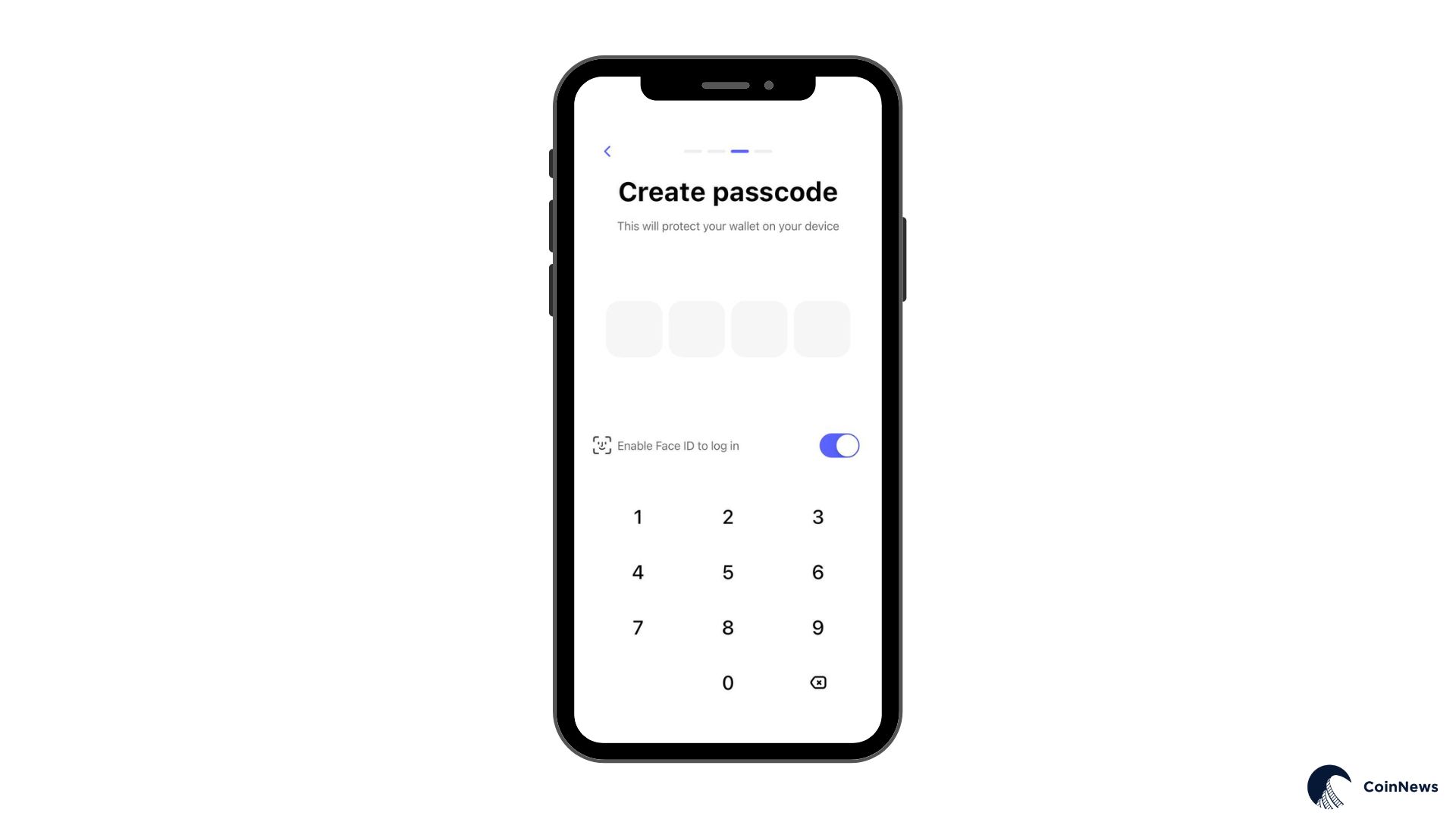
Create a PIN code for app access. You can also enable biometric authentication (fingerprint or Face ID) and activate two-factor authentication in settings for additional protection.
3️⃣ Verify Your Backup
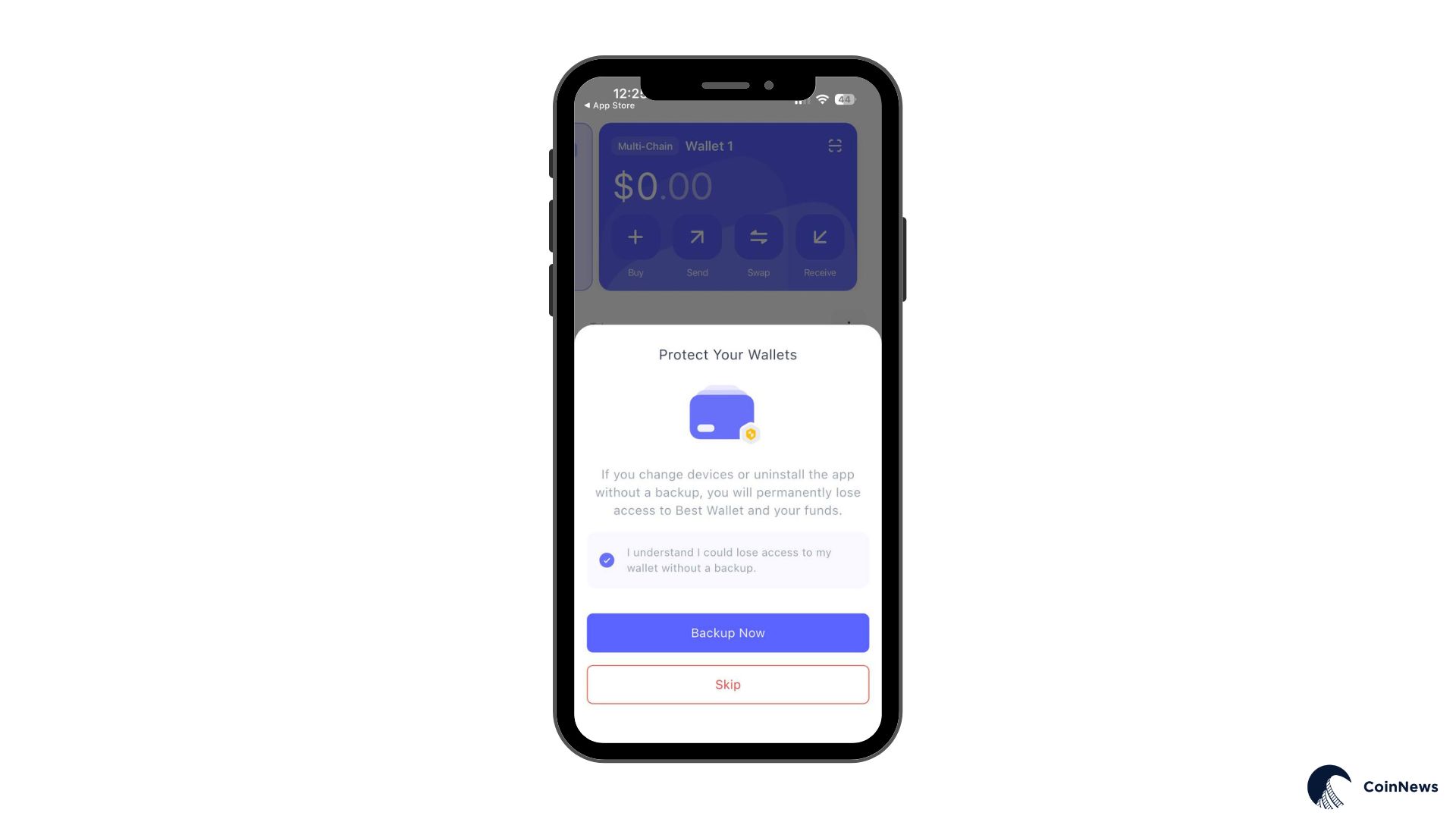
Best Wallet offers optional cloud backup through iCloud (iOS) or Google Drive (Android) to verify and protect your wallet recovery. You can skip it and rely solely on your manual pin code protection.
4️⃣ Create Your Wallet
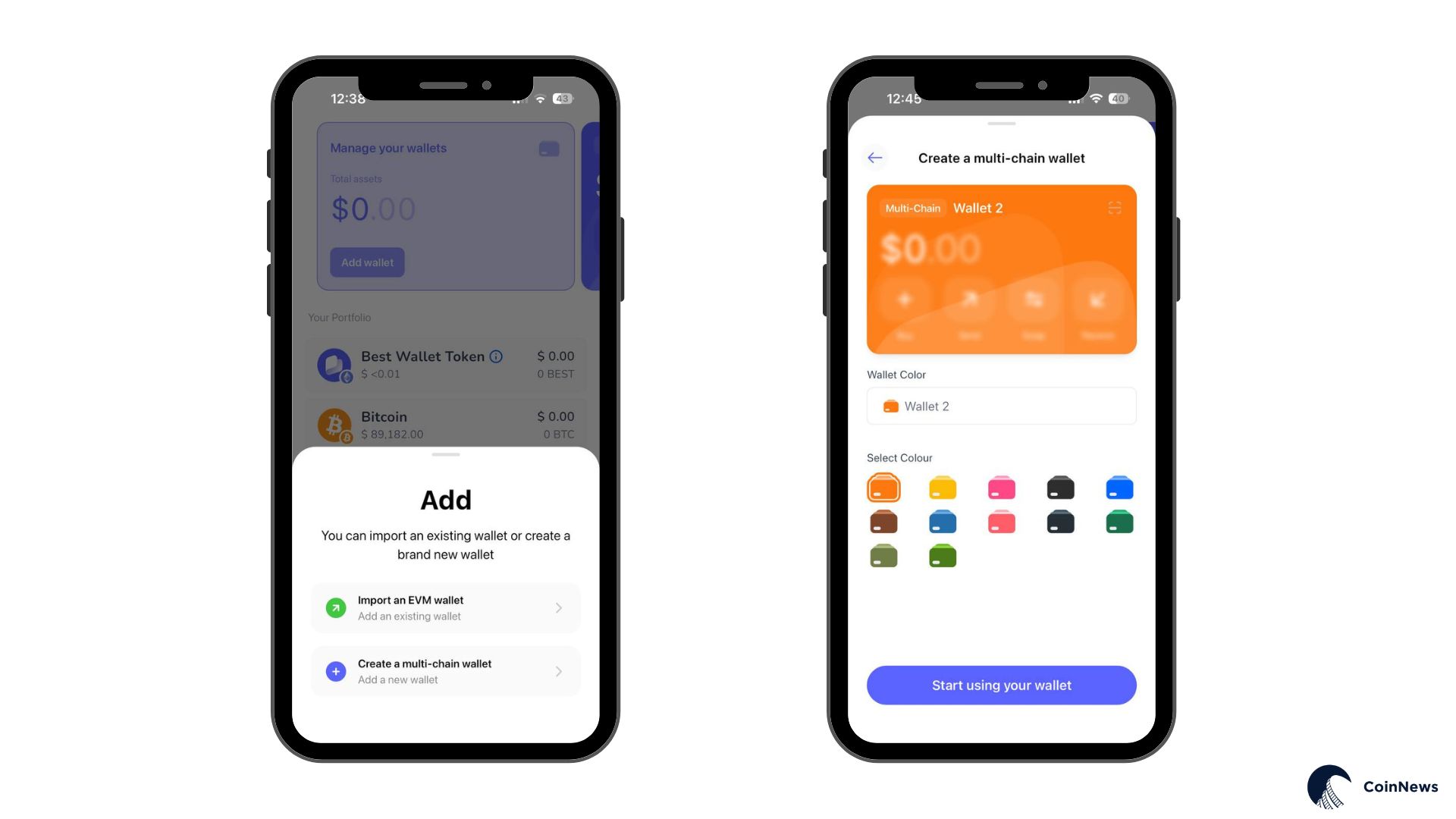
Open the app and tap “Add Wallet.” Choose a name and color for your wallet to help with organization. Tap “Start using your wallet” to complete the setup. Your wallet is now active and ready to use.
5️⃣ Add Assets
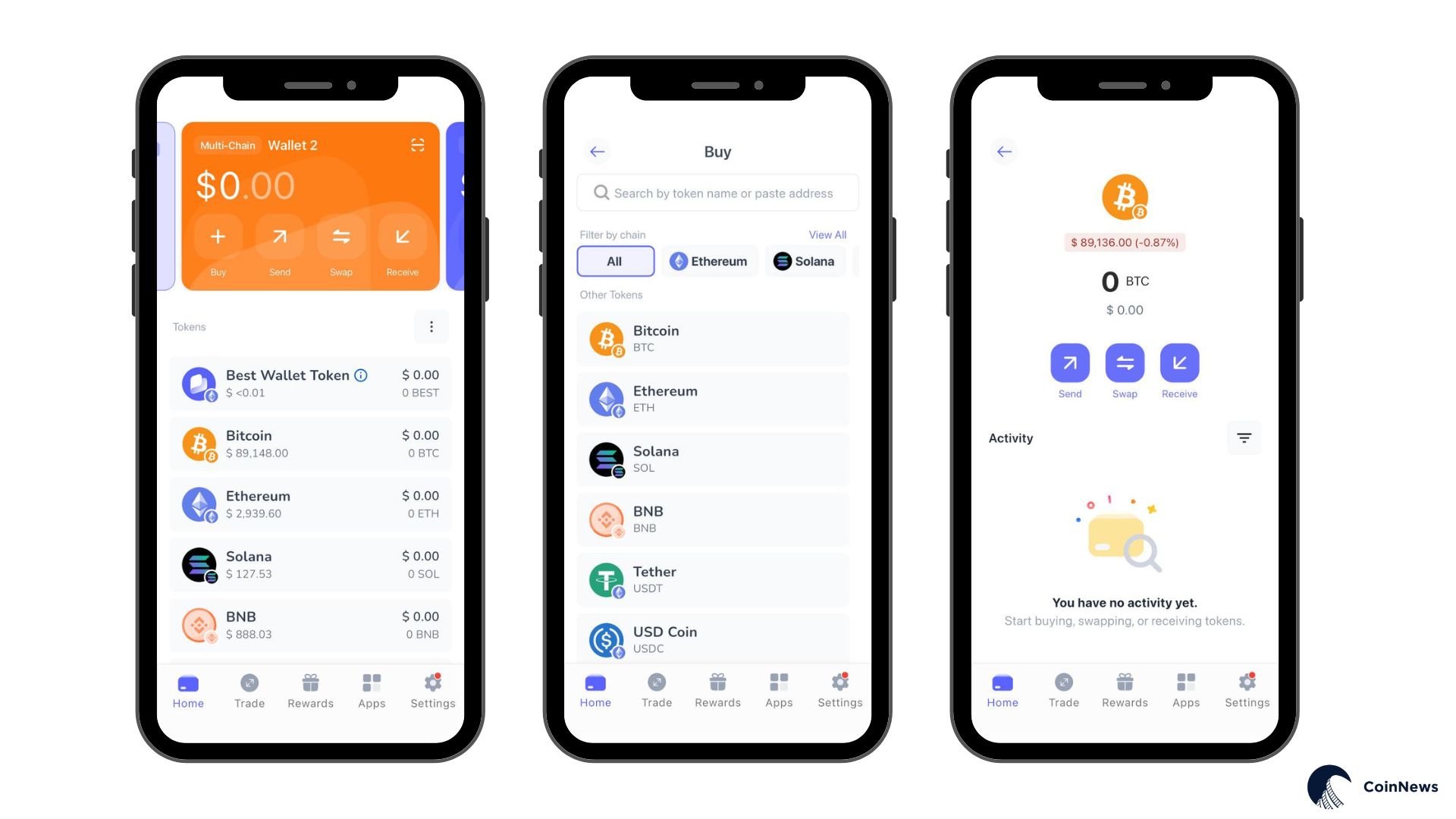
Tap the “+” icon to add cryptocurrencies you want to track. Select from the list or paste a contract address for custom tokens. Once added, you can buy, swap, or receive that currency directly from your wallet. Tap “Receive” to view your unique deposit address and QR code for that specific asset.
6️⃣ Start Using Features
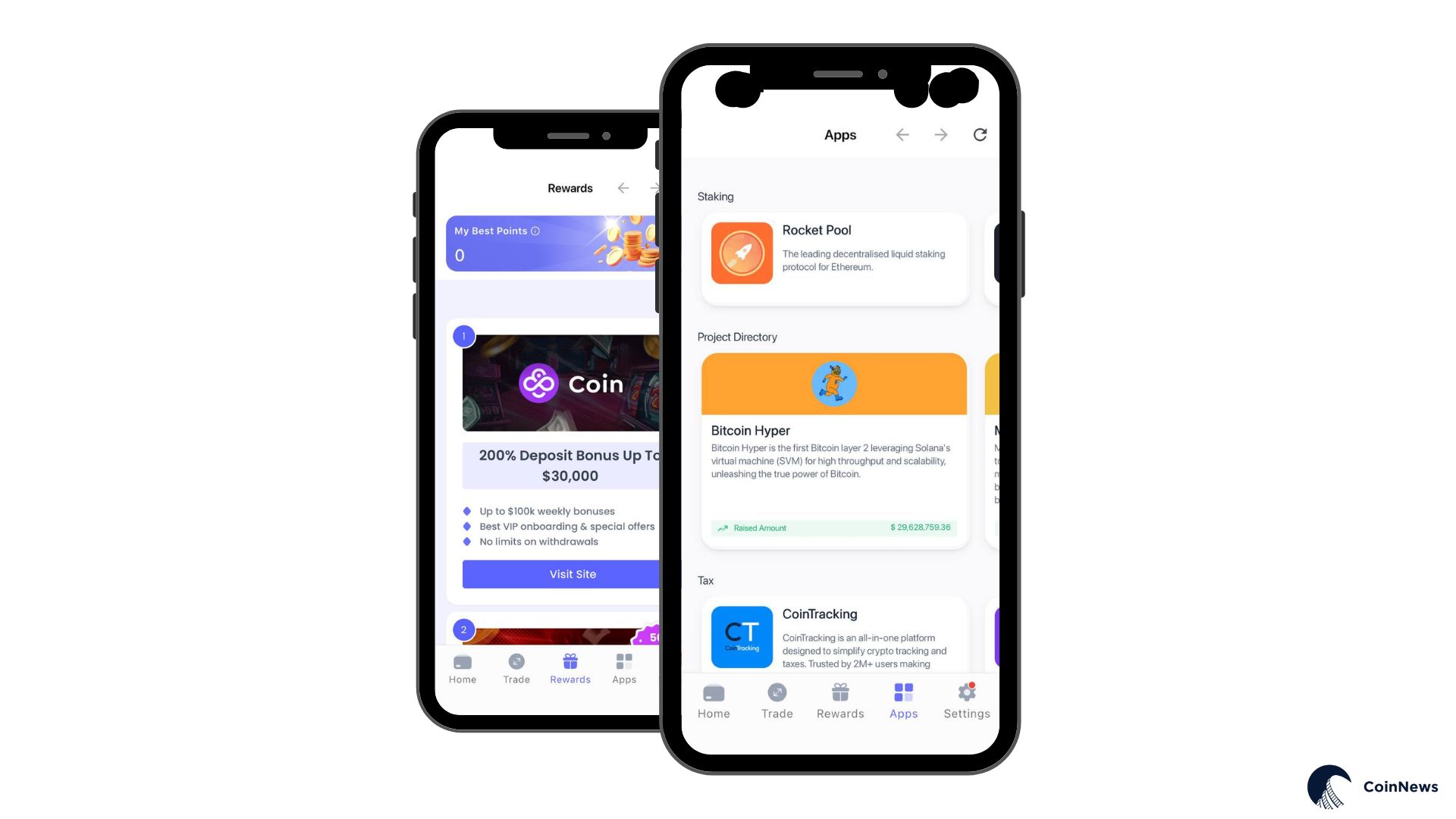
Explore the swap interface to trade tokens, browse the launchpad for presale opportunities, or connect to dApps through the built-in browser. Each feature includes guidance on first use.
How to Withdraw Money from Best Wallet
To withdraw crypto from Best Wallet, use the “Send” function to transfer your assets to another wallet or exchange.
Select the cryptocurrency you want to withdraw, tap “Send,” and paste the destination address. Confirm the transaction details and network fees, then approve the transfer. Your crypto will arrive at the destination address based on blockchain confirmation times.
To convert crypto to cash, send your assets to an exchange like Coinbase or Binance that offers fiat withdrawals. Once your crypto arrives, sell it for your local currency on the exchange and withdraw the funds to your bank account.
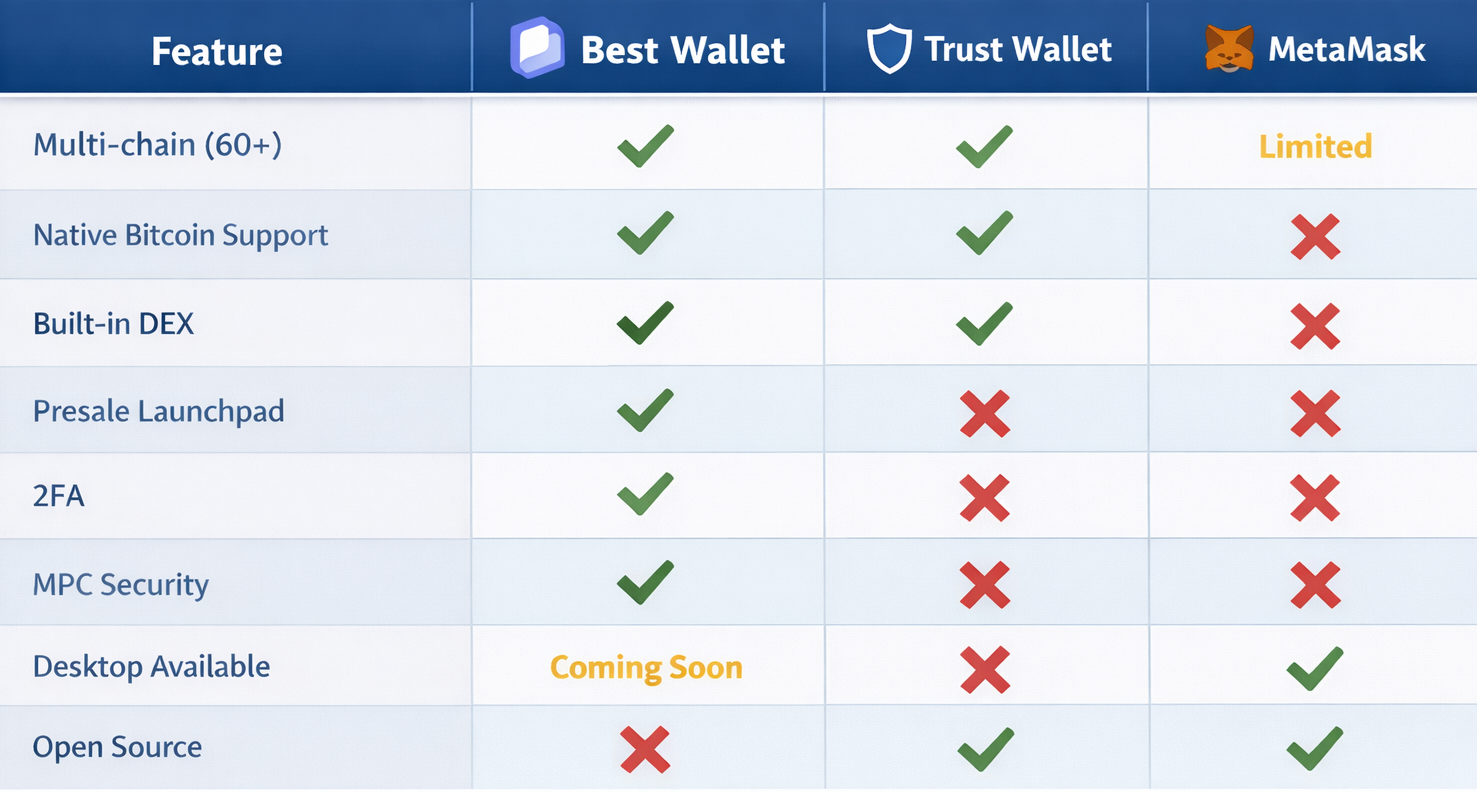
Best Wallet provides support primarily through email contact, with no live chat or phone support available. The service level matches most free wallet apps but falls below major exchanges. Response times vary based on user reports. Support teams appear active on Trustpilot, where they respond to most negative reviews and attempt to address issues. This engagement suggests they monitor feedback, but email-based support inevitably takes longer than live chat. FAQs and guides for common tasks like token additions, security features, and transaction troubleshooting fill the in-app Help Center. This self-service option handles many basic questions without support contact. Official Telegram and X accounts offer community channels where users sometimes get faster responses from moderators or other community members. Email remains the official route for account-specific issues or technical problems. Non-custodial wallet architecture limits what support can actually fix. If you lose your recovery details, no one can restore access. If a transaction fails due to network issues, support cannot reverse it. Self-custody places responsibility on users. Best Wallet fits certain user profiles better than others, so consider whether these descriptions match your situation. 💡Multi-chain investors who search for the next 1000x cryptos across Bitcoin, Ethereum, Solana, and other networks benefit from single-app management. Active DeFi participants who swap tokens frequently gain value from the integrated DEX aggregator. 💡Presale hunters get early token access but must accept the risks. Mobile-first users and privacy-focused individuals who want non-custodial storage without KYC requirements fit well here. Consider alternatives if you need desktop access today, hardware wallet integration, fully transparent teams, or open-source code. Simple one-asset storage needs make extensive features feel excessive. Best Wallet combines many capabilities at once, so users who want those features together benefit most. More focused alternatives better serve simpler needs. Best Wallet competes with several top cryptocurrency wallets in the market. Here all the key differences: Both offer mobile multi-chain support with built-in swap functionality. Trust Wallet has a longer track record, open-source code, and Binance backing. Best Wallet offers the presale launchpad, MPC security, and 2FA that Trust Wallet lacks. Trust Wallet feels more proven, while Best Wallet feels more feature-rich. MetaMask dominates desktop browser usage and works well for Ethereum and EVM chains. Best Wallet supports non-EVM networks like Bitcoin and Solana natively, which the former lacks. Swap fees reach 0.875% on the first platform, while the other appears to charge nothing beyond network fees. Desktop users prefer the established option, but mobile and multi-chain support belong to Best Wallet. Hardware wallets provide maximum security through offline key storage. Long-term holdings you rarely move suit this approach best. Best Wallet offers convenience for active use but carries more risk as a hot wallet. Many serious users combine both with hardware for savings and the Best Wallet for daily transactions. Best Wallet attempts to combine the strengths of multiple wallet types and adds unique features like the launchpad. Your priorities determine whether this combination appeals to you. Our evaluation combined hands-on testing with research verification across multiple dimensions. ➡️ 1. Direct Testing (30%): Installation on both iOS and Android devices, wallet creation, test transactions, swap execution, launchpad exploration, and sustained feature use over several weeks. ➡️ 2. Security Analysis (25%): Examination of security architecture, Fireblocks MPC technology research, audit documentation review, and threat model assessment for this hot wallet type. ➡️ 3. User Experience Evaluation (15%): Assessment of setup difficulty, interface design, navigation logic, and daily usage friction through sustained practical use. ➡️ 4. Community Research (15%): User feedback review across App Store, Google Play, Trustpilot, Reddit, and Telegram to capture sentiment beyond our individual experience. ➡️ 5. Competitive Benchmarking (10%): Feature, fee, and capability comparisons against Trust Wallet, MetaMask, and hardware wallet alternatives. ➡️ 6. Documentation Review (5%): Official materials examination from the whitepaper to roadmap, support documentation, and company registration details. ‼️We aimed for an objective assessment that acknowledges both strengths and concerns. Best Wallet offers genuine utility through its feature set, but questions about team transparency and the presale business model deserve honest treatment. We present findings without hidden issues so readers can make informed decisions. Multi-chain users who need comprehensive features in one mobile app will find that Best Wallet serves their needs well. Strong security measures, extensive blockchain support, and integrated DEX functionality make it competitive. Risk-tolerant investors gain unique value from the presale launchpad access. Anonymous developers and mixed community feedback on presale outcomes present valid concerns for cautious users. Best Wallet implements strong security for a hot wallet with MPC key management, 2FA, biometric login, and device encryption. Your keys stay on your device, and the company cannot access them. No security breaches have been reported. Hardware wallets remain more secure for large, long-term holdings, but Best Wallet provides adequate protection for its category. Best Wallet functions as advertised with a substantial user base and positive app store reviews. Scam accusations on forums typically stem from presale token losses and team anonymity instead of wallet theft. Best Wallet EOOD holds legal registration in Bulgaria. Legitimate operation exists, but team transparency and presale outcomes generate valid concerns. Best Wallet requires no subscription costs and is free to download. You pay standard blockchain network fees on transactions. Swap rates come from DEX aggregators without apparent markup. Fiat purchases involve third-party provider fees, typically 2-3%. $BEST holders receive additional fee discounts on swaps and future staking rewards. Use the in-app “Sell” feature to convert crypto to fiat through integrated payment providers. KYC verification is required. Alternatively, send crypto to an exchange that offers fiat withdrawals and cash out there. Step-by-step instructions appear in the setup section of this review. Best Wallet supports NFTs on the Ethereum and Polygon networks. You can view, store, and transfer collectibles through the app. Developers plan a more feature-rich NFT gallery for future updates to enhance display and management capabilities for digital collectibles. Staking currently works through connections to external protocols like Lido and Rocket Pool. Developers build a native staking aggregator that will automatically find the best yields across platforms. $BEST token holders will receive higher APY rates once the aggregator launches as part of the token utility benefits. US users can download and use Best Wallet without restrictions on basic wallet functions. Fiat services depend on third-party provider availability and may vary by state. No-KYC operation applies to core features, but fiat on-ramps require identity verification through payment providers.Customer Service / Customer Support
Who is Best Wallet Best for?
Alternatives & Comparisons
Best Wallet vs Trust Wallet
Best Wallet vs MetaMask
Best Wallet vs Hardware Wallets (Ledger, Trezor)
Methodology: How We Reviewed This Wallet
FAQs About Best Wallet Opinions
Is Best Wallet a Good Crypto Wallet?
Is Best Wallet Safe?
Is Best Wallet a Scam or Legit?
What Are the Fees for Best Wallet?
How Do I Withdraw Money from Best Wallet?
Does Best Wallet Support NFTs?
Can I Stake Crypto in Best Wallet?
Is Best Wallet Available in the US?